
Apart from my laptop (HP nx7010) I always have a powerful workstation in my desk. The Desktop serves as my experiment (R & D) machine – in other words, the machine that I trash every few weeks with beta software (like VS 2005 CTPs!) and have it reinstalled. Because of this, the desktop gets outdated very quickly and I get a replacement done every 12 months or so.
The latest desktop in this series has been my new AMD 64 based beast with 2GB RAM and Sony 17″ LCD. Though I got it about two months back, only early April 2005 I installed Windows XP 64-bit on it.

Though I was skeptical initially (mainly due to the claims on the media that 64-bit is only for Servers campaign for years) about 64-bit, after using the machine for almost 2 weeks+ I should confess that I have fallen in love. Everything about it has been good, Windows boots up in seconds (unlike minutes with my co-workers desktops) , all applications I use including Visual Studio.NET, Word or Excel come up almost instantly. The reliability is unbelievable.
Remember the bad ol’ days of Win16 to Win32 upgrade?. Oh’ god, I don’t want to relive it. But this time the upgrade to 64-bit has been without any major compatibility problems. The only two issues I faced are:
- Non of the major Antivirus vendors support Windows XP x64 (they do support Windows Server 2003 on Itanium platform). I tried unsuccessfully with our existing AV Vendor – Symantec (we use in all machines NAV CE) who said they have no firm dates for support, CA E-Trust Eval & AVG Eval. Amongst this NAV and E-Trust gets installed but their Real-Time Support don’t work – what good is an AV without Real-time protection anyways?. After a Google Search, I found this E-Week Article “Windows x64 Lacks Major Anti-Virus Coverage”, that confirmed my findings. But the same article pointed me to “Avast! Pro“, writing to their sales, got me an instant reply with a path to download. I downloaded and installed their eval today morning. It seems to work like a charm!
- Non of the HP printer drivers that came with your printer will install. Windows XP 64, requires all drivers to be 64-bit. But after experimenting with a few HP printer drivers that comes along with Windows from Microsoft, I got our Network Printer working.
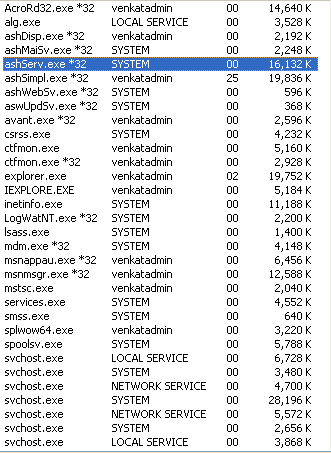
In Windows XP 64, 32 & 64 bit applications run side by side, with the 32 bit legacy application (the new application you wrote yesterday with Win32 API is now called legacy) running on a WOW (Windows on Windows) layer. Notice all the major applications that comes in Windows are now 64-bit, this includes your Explorer and Internet Explorer. Notice in the screenshot below after the application name *32 indicating these are 32-bit applications.
So if you are buying a machine any time soon, go for the big jump – the 64 bit jump. For me, I am now waiting for the jump to 128-bit :-)
Discover more from Mangoidiots
Subscribe to get the latest posts sent to your email.